How to Perform Spot Trading on Bitget? - Website Guide
[Estimated Reading Time: 3 mins]
This article provides a step-by-step guide for performing spot trading on the Bitget website. Spot trading allows you to buy or sell cryptocurrencies at the current market price.
What is Spot Trading?
Ang spot trading ay ang direktang pagbili o pagbebenta ng mga cryptocurrency gamit ang mga magagamit na pondo. Pinapayagan nito ang mga negosyante na agad na bumili o magbenta ng mga asset tulad ng Bitcoin o Ethereum sa kasalukuyang presyo sa merkado. Sa Bitget, ang spot trading ay nag-aalok ng mga kompetitibong bayarin, madaling gamiting interface, at access sa malawak na hanay ng mga trading pair, kaya mainam itong pagpipilian para sa mga nagsisimula at bihasang trader.
How to Spot Trade on the Bitget Website?
Step 1: Navigate to the Spot Trading Section
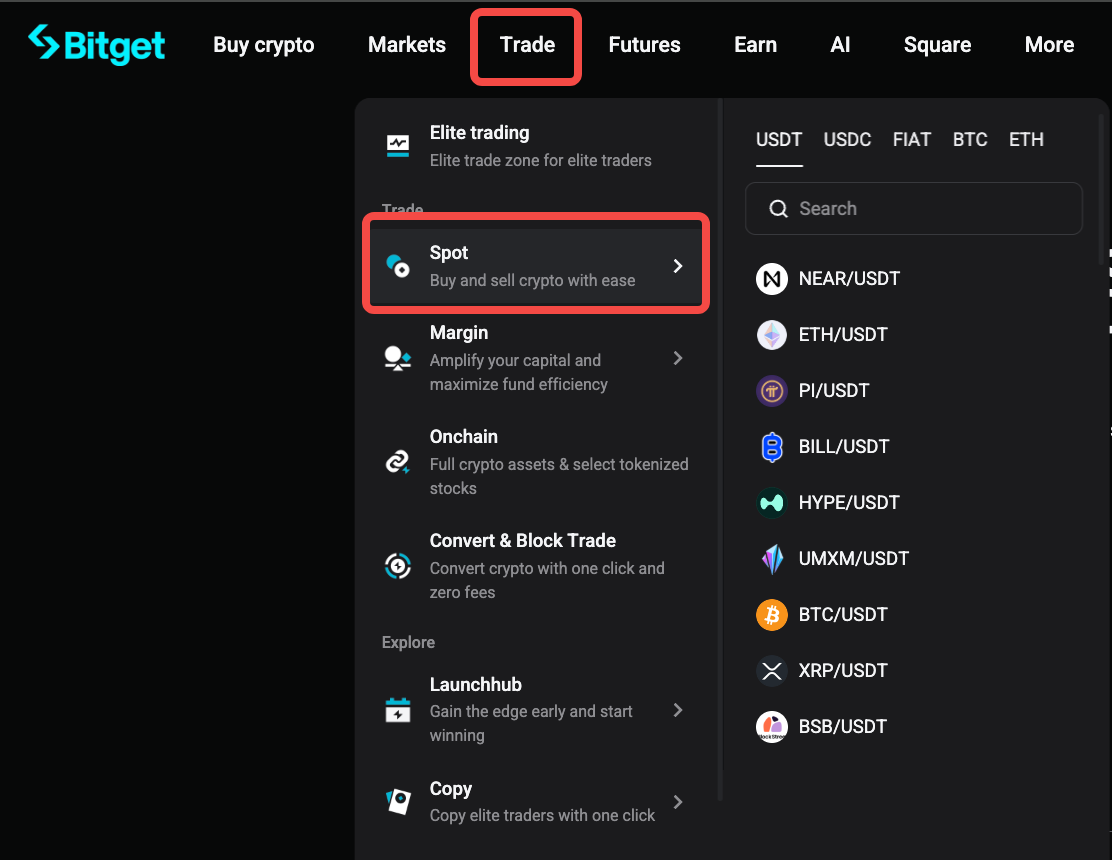
1. Click Trade in the top navigation bar.
2. Select Spot Trading from the dropdown menu.
Step 2: Choose a Trading Pair
1. On the trading interface, locate the search bar in the top-left corner.
2. Type the name of the cryptocurrency pair you wish to trade (e.g., BTC/USDT) and select it from the list.

Step 3: Choose an order type and place your order
Maaari kang pumili ng Market order o Limit order batay sa kung paano mo gustong isagawa ang iyong kalakalan.
Option 1: Place a market order
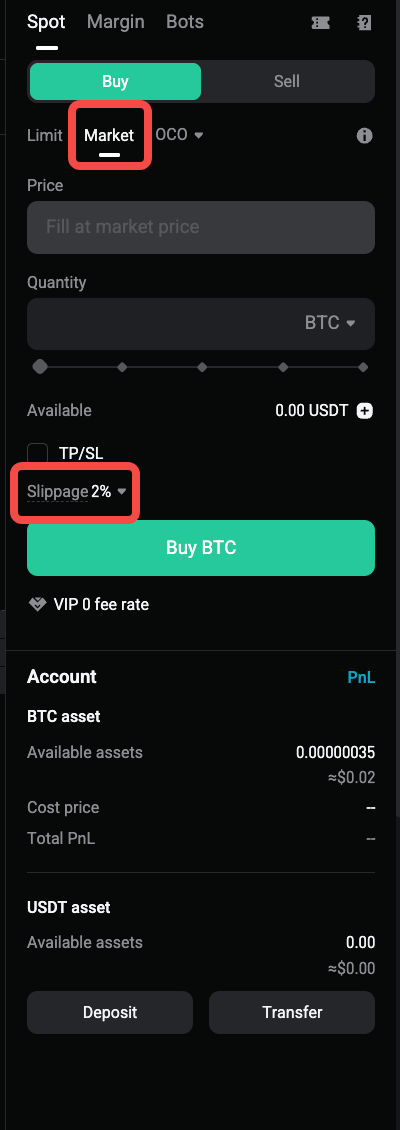
Ang isang market order ay agad na inilalagay sa pinakamagandang presyong makukuha sa merkado. Dahil mabilis na nagbabago ang mga presyo sa merkado, ang pangwakas na presyo ng pagpapatupad ay maaaring iba sa presyong ipinapakita bago ka maglagay ng order.
Bitget supports slippage tolerance and slippage warning for regular market orders.
1. Select Market as the order type.
2. Enter the amount you want to buy or sell.
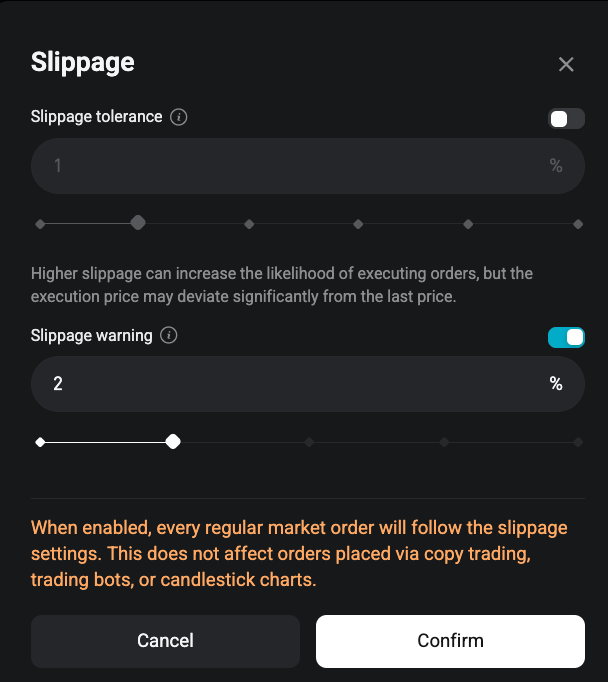
3. Choose whether to set slippage tolerance.
-
After you configure slippage tolerance, the system will set a limit on the execution price of your market order.
-
Any unfilled part of the order that exceeds the slippage tolerance will be canceled.
-
Due to rapid market price changes, the final execution price may still deviate from your configured setting.
4. Choose whether to enable slippage warning.
-
-
After you enable slippage warning, the system will check market data each time you place a market order.
-
If the estimated slippage exceeds your tolerance value, you will receive an alert before continuing with the order.
-
5. Click Buy or Sell to place the order.
Note: Once enabled, the slippage settings will apply to every regular market order. These settings do not affect orders placed through copy trading, trading bots, or candlestick charts.
Example: To buy $100 worth of BTC, select Market, enter 100 USDT in the Total field, review your slippage settings, and click Buy BTC.
Option 2: Place a limit order
A limit order lets you set the price at which you want to buy or sell. The order will only execute when the market price reaches your set price.
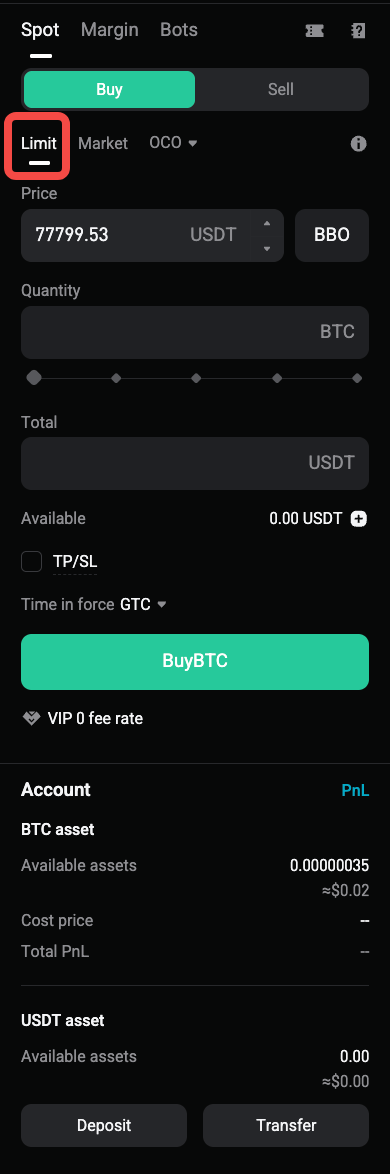
1. Select Limit as the order type.
2. Enter your desired price.
3. Enter the quantity you want to buy or sell.
4. Click Buy or Sell to place the order.
5. Monitor your order under Open Orders until it is filled or canceled.
Example: To buy one BTC at $85,000, set the price to $85,000 and the quantity to one BTC.

6. Monitor your order under the Orders tab to see when it is filled.
Step 4: Check Your Order History
After placing an order, you can track its status and view past transactions:
1. Go to the Open Orders to see active or unfulfilled orders.
2. Choose Order History to review completed or canceled trades.
Tips for Spot Trading on Bitget
-
Market Orders: Use these for quick trades but note that they execute at the best available price, which may vary slightly due to market volatility.
-
Limit Orders: Ideal for setting strategic entry or exit points without constantly monitoring the market.
-
Manage Risk: Avoid trading with funds you cannot afford to lose.
-
Stay Updated: Monitor market trends and news for informed trading decisions.
FAQs
1. What is the difference between a market order and a limit order?
Ang isang market order ay agad na inilalagay sa pinakamagandang presyong makukuha sa merkado. A limit order lets you set your own price and will only execute when the market reaches that price.
2. What is slippage tolerance for market orders?
Slippage tolerance sets a limit on the execution price of a market order. Any unfilled part of the order that exceeds the slippage tolerance will be canceled.
3. Why may the final execution price be different from my slippage tolerance setting?
Market prices may change quickly when you place an order. Due to rapid market movement, the final execution price may still deviate from your configured setting.
4. What is slippage warning?
Slippage warning checks market data each time you place a market order. Kung ang tinantyang slippage ay lumampas sa iyong tolerance value, magpapakita ang system ng alerto bago ka magpatuloy.
5. Will slippage settings apply to all order types?
Ang mga setting ng slippage ay nalalapat sa mga regular na market order kapag na-enable na. Hindi nito naaapektuhan ang mga order na inilagay sa pamamagitan ng copy trading, trading bots, o candlestick charts.
6. Why was part of my market order canceled?
Maaaring kanselahin ang bahagi ng iyong market order kung ang presyo ng pagpapatupad ay lumampas sa iyong slippage tolerance. Pupunuin lamang ng sistema ang bahaging nananatili sa loob ng pinapayagang saklaw.
7. Can I cancel a pending limit order?
Maaari mong kanselahin ang isang nakabinbing limit order mula sa mga Open Order bago ito ganap na maisagawa.
8. What fees apply to spot trading?
Maaaring mag-iba ang mga bayarin sa spot trading batay sa antas ng iyong account at pares ng kalakalan. Check the Bitget fee schedule for the latest rates.
Disclaimer and Risk Warning
Ang lahat ng trading tutorial na ibinibigay ng Bitget ay para sa layuning pang-edukasyon lamang at hindi dapat ituring na financial advice. Ang mga estratehiya at halimbawang ibinahagi ay para lamang sa mga layuning paglalarawan at maaaring hindi sumasalamin sa aktwal na mga kondisyon ng merkado. Ang pag-trade ng cryptocurrency ay may kaakibat na malaking panganib, kabilang ang posibilidad na mawala ang iyong mga pondo. Ang nakaraang pagganap ay hindi garantiya ng mga resulta sa hinaharap. Always conduct thorough research, understand the risks involved. Bitget is not responsible for any trading decisions made by users.
Ibahagi