
How Does Delta-Neutral Mode Work in the Unified Trading Account?
Ang kasalukuyang artikulo ay hindi sumusuporta sa wikang iyong pinili, ito ay awtomatikong inirerekomenda sa Ingles para sa iyo
How Does Delta-Neutral Mode Work in the Unified Trading Account?
[Estimated reading time: 5 minutes]
Delta-Neutral Mode is designed for traders running hedging strategies such as funding-rate arbitrage and basis arbitrage under the Unified Trading Account. Once enabled, qualifying hedged positions receive a lower ranking in the Auto-Deleveraging (ADL) queue, reducing the likelihood of being auto-deleveraged under extreme market conditions.
Eligibility Requirements
Delta-Neutral Mode is a toggle within Trading Settings under Unified Trading Account - Advanced Mode. No whitelist is required - the entry point is visible to all users.
To enable it, you must meet any one of the following identity conditions: VIP3+ user / Pro user / market maker / institutional lending user
Once enabled, a position must meet the following conditions to be considered a hedged position:
• Account mode is Unified Trading Account - Advanced Mode
• The position is cross-margin; isolated-margin futures positions are excluded from eligibility
• Net futures position of the asset ÷ Total position of the asset ≤ 5%
Notes:
• Demo trading is not subject to identity restrictions - all users can enable and try the feature
• Identity verification is triggered only once, at the moment you enable the toggle; subsequent changes to your identity status do not affect the already-enabled state
• Once enabled, collateral is fixed to all currencies and cannot be customized
• You can hold and trade isolated-margin futures positions while the toggle is enabled; however, ADL ranking for isolated-margin positions follows the standard isolated-margin rules and is not affected by this feature
Notice for existing Delta-Neutral Mode users: if your account mode was already set to "Delta-Neutral Mode," you may continue using it as long as you do not manually switch account modes. Once you switch away, you cannot switch back, and you will need to enable this toggle under Advanced Mode instead.
Changes to ADL Ranking Under Delta-Neutral Mode
Positions that meet the hedging criteria have their ranking in the ADL queue moved lower overall - ADL will only reach hedged positions after all non-qualifying positions have been settled. The relative ranking order among hedged positions themselves remains unchanged.
ADL Ranking Before the Change (hedged-position protection not applied; ranked by standard ADL score):
|
User
|
Margin Mode
|
Delta-Neutral Toggle
|
Net Position Ratio
|
Qualifies as Hedged
|
Rank
|
|
User1
|
UTA Cross
|
Enabled
|
2%
|
Yes
|
1
|
|
User2
|
UTA Cross
|
Disabled
|
2%
|
No
|
2
|
|
User3
|
UTA Cross
|
Enabled
|
4.5%
|
Yes
|
3
|
|
User4
|
UTA Isolated
|
Enabled
|
2%
|
No
|
4
|
|
User5
|
Classic Account
|
N/A
|
N/A
|
No
|
5
|
|
User6
|
UTA Cross
|
Enabled
|
8%
|
No
|
6
|
ADL Ranking After the Change (hedged-position protection applied; hedged positions moved lower as a group):
|
User
|
Margin Mode
|
Delta-Neutral Toggle
|
Net Position Ratio
|
Qualifies as Hedged
|
Rank
|
|
User2
|
UTA Cross
|
Disabled
|
2%
|
No
|
1
|
|
User4
|
UTA Isolated
|
Enabled
|
2%
|
No
|
2
|
|
User5
|
Classic Account
|
N/A
|
N/A
|
No
|
3
|
|
User6
|
UTA Cross
|
Enabled
|
8%
|
No
|
4
|
|
User1
|
UTA Cross
|
Enabled
|
2%
|
Yes
|
5
|
|
User3
|
UTA Cross
|
Enabled
|
4.5%
|
Yes
|
6
|
In the example above:
1. User2 has not enabled Delta-Neutral Mode, so this position is not evaluated for hedge eligibility and ranks under standard rules; the ranking is unaffected by this feature.
2. User4 holds an isolated-margin position, which is excluded from hedge eligibility and ranks under standard isolated-margin rules; the ranking is unaffected by this feature.
3. User5 holds a Classic Account, to which this feature does not apply, and ranks under standard logic.
4. User6's net position ratio of 8% exceeds the 5% threshold, so this position does not qualify as hedged; its ranking is unaffected.
5. User1 and User3 both have a net position ratio ≤ 5% and qualify as hedged positions: before the protection mechanism was applied, they ranked by standard ADL score; afterward, they are moved as a group to the end of the queue, with their relative order (User1 ahead of User3) preserved.
6. This protection mechanism only lowers a hedged position's priority in the ADL queue; it does not eliminate the risk of auto-deleveraging under extreme market conditions.
Hedged Position Qualification Formula
A position qualifies as hedged when: Net futures position of the asset ÷ Total position of the asset ≤ 5% (only cross-margin futures are counted; isolated-margin futures are excluded from this calculation)
Net futures position of the asset:
1. If there is no futures position in this asset, the net futures position = 0
2. If it is not 0, compare the direction of your holdings in this asset against the direction of the futures position:
• Same direction: Net futures position = |Asset holdings + Net futures position|
• Opposite direction, and |Asset holdings| ≥ |Net futures position|: Net futures position = 0
• Opposite direction, and |Asset holdings| < |Net futures position|: Net futures position = |Asset holdings + Net futures position|
Total position of the asset:
Total position = MAX[ Max(0, Asset holdings) + Sum of long futures positions in this asset, |Min(0, Asset holdings) + Sum of short futures positions in this asset| ]
• Net futures position: long positions are positive, short positions are negative
• Asset holdings: positive asset balances are positive, negative balances (liabilities) are negative
• Stablecoins are excluded from this calculation
Example
Suppose you hold the following BTC assets and positions (cross margin):
|
Type
|
Holdings/Position
|
|
Spot
|
10 BTC
|
|
BTCUSDT Perpetual
|
Short 13 BTC
|
Calculation:
1. Asset holdings = 10; net futures position = -13 (short is negative)
2. Opposite direction; comparing absolute values: |10| < |-13|, so net futures position = |10 - 13| = 3
3. Total position = MAX[ Max(0,10) + 0, |Min(0,10) + (-13)| ] = MAX[10, 13] = 13
4. Net futures position ÷ Total position = 3 ÷ 13 = 23% > 5%
Conclusion: this position does not qualify as hedged and does not receive ADL ranking protection; it ranks under standard rules.
How to Enable Delta-Neutral Mode
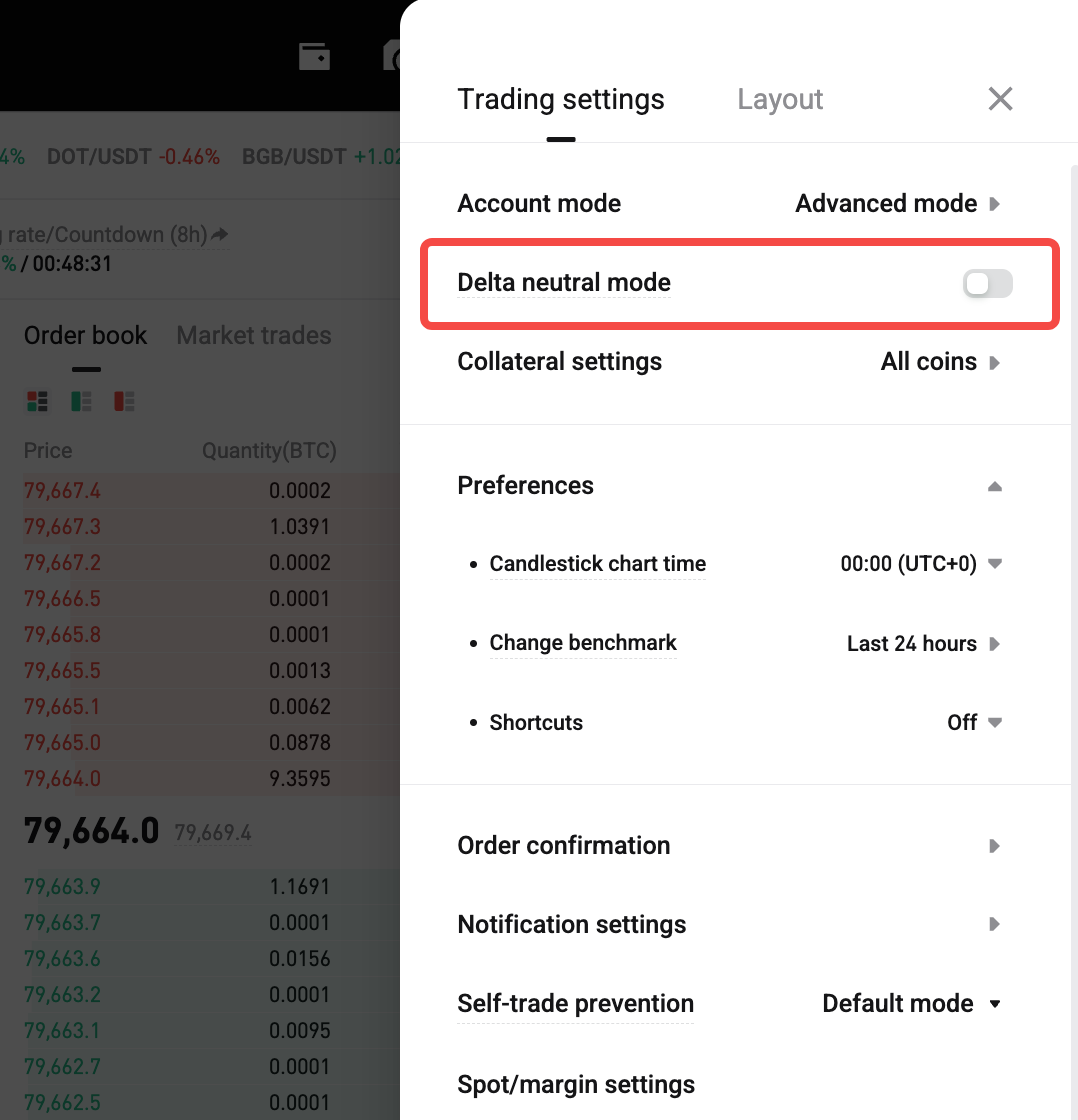
1. Go to Trading Settings and switch your account mode to Advanced Mode
2. Find the "Delta-Neutral Mode" toggle in Trading Settings under Advanced Mode
3. Tap to enable it; the system will automatically verify your account identity
4. If the identity requirement is not met, you will see: "Your account does not meet the requirements to enable this feature. You must be VIP3 or above, or meet specific user eligibility criteria, to enable Delta-Neutral Mode."
FAQs
1. Do I need to close my positions before enabling Delta-Neutral Mode?
No, you don't need to close your positions first, but you must meet the account mode switching requirements.
2. What happens if my position no longer meets the neutral criteria?
The system will automatically revert to standard position ADL ranking logic for risk management and ADL ranking.
3. Can different assets hedge each other?
No. Hedge evaluation is based on the same underlying asset. For example, BTC holdings can only hedge BTC futures positions.
4. Does enabling Delta-Neutral Mode affect margin or liquidation rules?
No. Delta-Neutral Mode primarily affects ADL ranking priority and does not change margin calculations, forced liquidation rules, or risk control policies.
5. Why wasn't my position recognized as a hedged position?
Possible reasons include:
• The futures position is not effectively hedged by spot holdings of the same asset
• The asset-level net position ratio exceeds the threshold
6. Does ADL ranking protection guarantee I won't be auto-deleveraged?
No. It only lowers the position's priority in the ADL queue. Auto-deleveraging can still occur under extreme market conditions.
7. I hold a large amount of spot assets - why isn't my position considered hedged?
Delta-Neutral evaluation is based on exposure to the same asset. Holding large amounts of other assets or stablecoins does not hedge a futures position in a different asset.
Risk Warning: Delta-Neutral Mode is designed to improve the trading experience for hedging strategies, but market volatility may still carry risk. Please participate in trading according to your own risk tolerance.
*Ang anunsyong ito ay sensitibo sa oras. Pansinin ang petsa ng paglalathala. Hindi mananagot ang platform para sa anumang direkta o di-tuwirang pagkalugi na nagmumula sa pagbabago ng mga kalagayan o lipas na nilalaman.